
Tekunda Team

Tekunda Team
Short answer: AI agents usually fail in production because of the system around the model, not the model itself. The usual causes are demo-sized scope, no real integration with the systems of record, generic context, silent failures nobody can trace, no feedback loop, and no one who owns the outcome or the cost. We hit most of these building our own outbound prospecting agent. Below is how to diagnose yours, and what we changed to make ours hold up.
The failure rate is not anecdotal. Gartner predicts that over 40% of agentic AI projects will be canceled by the end of 2027, citing escalating costs, unclear business value and inadequate risk controls. S&P Global Market Intelligence found that 42% of companies abandoned most of their AI initiatives in 2025, up from 17% the year before, and that organisations scrapped 46% of proofs of concept before production. MIT's NANDA research put the core problem in integration and learning, not model quality. We cover the wider picture in AI agents in 2026: what actually works and why most efforts stalled.
In our experience, those numbers break down into six failure modes:
Match the symptom to the cause before you change the model or the prompt:
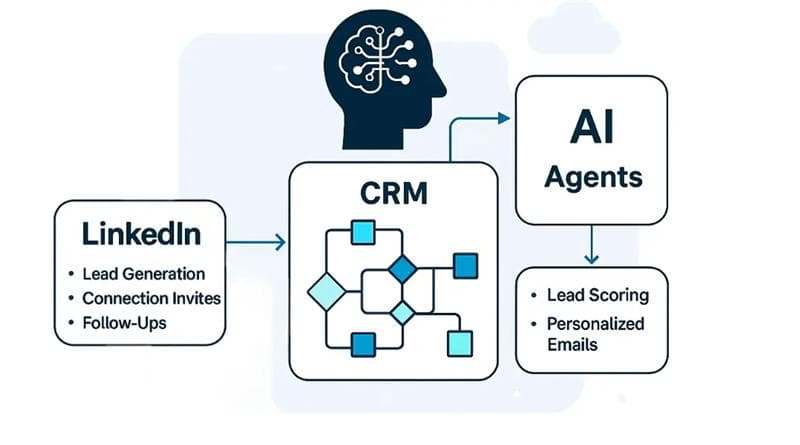
At Tekunda we wanted more than a meeting-room demo: an agent that automates outbound prospecting across LinkedIn and Salesforce, reasons over real context and books calls. Each step below exists because one of the failure modes above bit us first.
The agent owns a single workflow: from a LinkedIn lead list to a booked call. A search result or Sales Navigator list goes into Linked Helper, which automates connection invites within LinkedIn's weekly invitation limits, thank-you follow-ups and the sync into Salesforce. Once a new connection lands in the CRM, the agent takes over.
The agent reasons over past lead data, including conversion history, success criteria and segment traits, as retrieval context. We tested both vector stores and PostgreSQL-based retrieval and chose on performance and cost, with chunking and retrieval tuned for lead qualification rather than generic search.
Logic runs in Langflow, backed by custom Python flows and our internal MCP servers that handle API calls, enrichment and prompt execution. The flow is stateless and split into small micro-flows we reuse across campaigns. When one agent becomes several, handoffs become the next failure point, which is why we wrote up what makes agent-to-agent handoffs work in production.
For qualifying leads, the agent drafts a personalised email from company information, role signals and recent activity, with a call-to-action modelled on what worked in earlier wins. Every email is pushed back into Salesforce, so sales sees the same record the agent acted on.
We trace every agent output in Langfuse and internal dashboards, with structured error handling, prompt diffing and outcome analysis built into the flow. Conversion signals feed back into the ranking and prompt layers, and each week we refine prompts, retrain embeddings and tune scoring. That loop is the difference between an agent that decays and one that improves.
The result is no manual handoff from invite to booked call. LinkedIn caps the top of the funnel, but enrichment, scoring and email generation behind it scale with the pipeline.
If your agent lives inside Salesforce, decide early whether to configure or build: our guide to Agentforce vs custom AI agents walks through that call. And if you want an agent like this built around your own workflow, see how we build production AI agents or talk to our team.
Why do my AI agents work in testing but fail in production?
Testing usually runs on clean data and a single happy path. Production adds messy records, real integrations and edge cases, and without tracing those failures stay silent.
How many AI agent projects fail?
Gartner predicts over 40% of agentic AI projects will be canceled by the end of 2027, and S&P Global found 42% of companies abandoned most of their AI initiatives in 2025.
How do you monitor an AI agent in production?
Trace every run, including tool calls and retrievals, and track prompt changes against outcomes. Tools like Langfuse plus internal dashboards make agent decisions debuggable.
Should we build an AI agent in-house or work with a partner?
MIT's NANDA research reported that solutions bought from specialised vendors succeed far more often than internal builds. Build in-house when the workflow is core and you can staff observability and iteration.